Posts

Showing posts with the label SharePoint Concepts

What is Crawling & TYPES of SHAREPOINT CRAWL

Crawling: Crawling is the process of gathering the content for search. Types of SharePoint crawl: Full Crawl Incremental Crawl Continuous Crawl FULL CRAWL During a full crawl, the search engine crawls, processes and indexes every item in the content source, regardless of the previous crawl status. INCREMENTAL CRAWL In most cases, we do not need to (re-)index everything in the content source. Instead, incremental crawl enables the Crawler to crawl only the items which have been newly created or modified since the last crawl. Continuous Crawl Similar to incremental, however significantly different, too, continuous crawl is a dynamic way of crawling SharePoint and Office 365 content. When it is enabled on a content source, the Crawler checks the SharePoint change logs regularly (every 15 min, by default) and looks for recent changes. If there’s any item on the changelog, the Crawler takes immediate action on it and sends to the Content Processor. Please refer this link ...
Comparison (cookies vs cache), (PUT vs POST) && (JSLink vs Script Editor vs Content Editor WebPart)

cookies vs cache Cookie  should be used to store  per-user  information for the current Web session or  persistent information on the  client , therefore client has control over the contents of a cookie. Cache  object is  shared between users in a single application . Its primary purpose is to cache data from a data store and should not be used as a primary storage. It supports  automatic invalidation  features. Refer this link for more details  Link1 PUT vs POST The most commonly used HTTP verbs POST, GET, PUT, DELETE are similar to CRUD (Create, Read, Update and Delete) operations in database. We specify these HTTP verbs in the capital case. So, the below is the comparison between them. create - POST read - GET update - PUT delete - DELETE PATCH: Submits a partial modification to a resource. If you only need to update one field for the resource, you may want to use the PATCH method. Refer this link for mo...

Client Side Rendering

Image
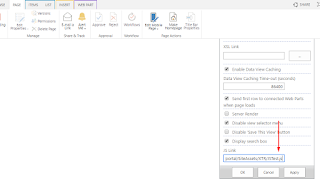
In SharePoint 2013, Client Side Rendering  is used for rendering list views, list forms and search results We need to add this JSLink under web part properties. So basically, what CSR does is it gets the JS object with raw data as input, and renders huge HTML string based on it After HTML string is fully formed, it is inserted into the DOM. Please refer this link for more details  Link1   Link2

Difference between Sandboxed and Farm solution

  Farm solutions , which are hosted in the IIS worker process ( W3WP.exe ), run code that  can affect the whole farm .  Sandboxed solutions , which are hosted in the SharePoint user code solution worker process ( SPUCWorkerProcess.exe ), run code that  can only affect the site collection of the solution .Farm solutions are installed and deployed.  Sandboxed solutions are uploaded and activated. Refer this link for more details  Link

Web.config

Web.config Web.config is the main settings and configuration file for a web application. The file is an XML document that defines configuration information regarding the web application. Where is SharePoint web.config? There is a separate web.config file for each Web Application / IIS Website which is running an instance of SharePoint.  For example, there will be a web.config file in the root of the virtual directory for each application. There is also a separate web.config file which contains configuration details for the "_layouts", "_catalogs", etc directories of SharePoint sites. see this link for more info Locatiom: Drive\Inetpub\Wwwroot\WSS\VirtualDirectories\<port number of your web-application>\web.config see this link for more details

Site Collection Administrator vs Site Owner (Full Control) in SharePoint

Image
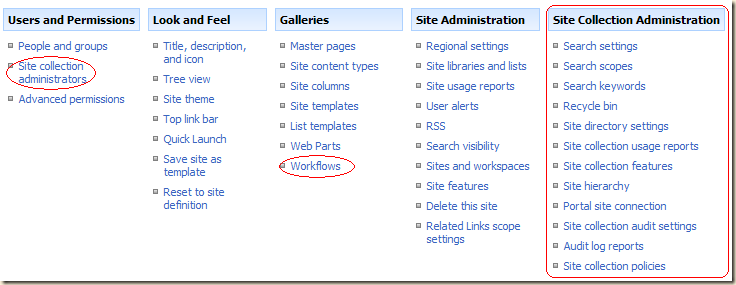
SharePoint Server (system?) Administrator  – responsible for the physical servers, software installation, backup, etc. SharePoint Site Collection Administrator  – the user responsible for the entire site collection , has access to Site Collection wide features in several places including Site Settings. SharePoint Site Owner  – a user with “full control” rights to a single site , it’s lists, libraries and content, and any sub sites and workspaces created below it.  I.e. responsible for a “branch” of a site collection.  Here's a list of what the Site Collection Administrator can see that the Site Owner (Full Control user) can not:  Site Actions -> Site Settings -- Users and Permissions   ---- Site collection administrators (only an option when at a top level site)  -- Galleries   ---- Workflows  -- Site Administration   ---- Content and structure logs  --  The entire Site Collection Administration column...

Advantage of PowerShell

Windows PowerShell is a command-line shell and scripting language that  provides an administrator full access  to applicable application programming interfaces ( APIs ). Administrators  can interact directly  with SharePoint 2013 to manipulate web applications, site collections, sites, lists and much more. In addition, an administrator can script cmdlets (pronounced "command-lets"). Advantage Without using PowerShell, you may limited to the use the GUI of Central Administration, SharePoint Designer and Site Settings. There are a number of features that you simply can't use without running PowerShell because there is no GUI support for those features.

load vs loadquery && ExecuteQuery vs ExecuteQueryAsync in sharepoint

Load  Load() populate the client object directly with what it gets data from the serve r i.e. a sollection eg. ListItemCollection. Means Load() returns ListCollection. LoadQuery LoadQuery() returns the data as a new collection in IEnumerable format . LoadQuery() is flexible than Load() when you are working with more than one query(i.e More than one list) because LoadQuery() returns data in IEnumerable<> format which is easy to acces. Load LoadQuery Load method populates the data whatever it gets from the server. Note: Mostly it is Useful for get single list LoadQuery method populates the data in completely new object of the type – IEnumerable  Note: Mostly it is Useful for multiple list Example : Var List = ClientContext.Web.Lists.GetByTitle("ListName"); ClientContext.Load(List); ClientContext.ExecuteQuery(); Example : IEnumerable ListCollection = ClientContext. LoadQuery (ClientContext.Web.Lists); ClientContext.ExecuteQuery(); Object is loaded into ClientCo...

SharePoint 2010 API (Application Programming Interface)

( API ) specifies how some software components should interact with each other Microsoft SharePoint 2010 provides three sets of APIs The server-side object model The managed client object model Web services Deciding Which SharePoint 2010 API to Use Each API has advantages and limitations that you need to understand before you begin planning and developing custom solutions.  For example, the server-side object model provides the most extensive set of options for developing customizations, but it can be used only on computers that are running a version of SharePoint 2010. See this link for more details

What are Site Columns?

 Its a central, reusable column definition.  A site column can be used across sub sites or lists inside the site collection. See this codeproject link to know more

Which is better, CAML query or LINQ query in SharePoint 2010 ?

Collaborative Application Markup Language  ( CAML ) vs  Language-Integrated Query ( LINQ ) CAML is always better than LINQ because if you write LINQ query then finally it converts in CAML internally so it down the performance. Of course there is other advantages of LINQ like: Sorting/filtering/can return objects / Most imp part, it is object oriented etc. LINQ Example: site.Load(Groupcoll, groups => groups.Include(group => group.Users)); CAML Query Example: <View>   <Query>     <Where>       <BeginsWith>         <FieldRef Name="ContentTypeId" />         <Value Type="ContentTypeId">0x010200</Value>       </BeginsWith>     </Where>   </Query>   <ViewFields>   </ViewFields>   <RowLimit Paged="TRUE">214748364...

Key Performance Indicators KPIs [SharePoint]

KPI(Key Performance Indicators) is a visual aid to help to represent the progress status KPI is a visual aid to help communicate the progress achieved towards an already specified goal. These are of relevant importance to managers and teams which work in the business sector since by the means of KPI one can evaluate the amount of progress made towards achieving a goal.   KPI Styles In order to make use of KPIs, one needs to decide from where the data is going to be achieved:   From SharePoint lists : used to keep track of totals (ex total number of sales or how long it has taken a person to finish up a project phase). It is also used to count items that are found in a workflow or contains dates and/or to calculate the completion percentage of a task. From SQL Server 2005 Analysis Services : a system administrator or database analyst sets up these KPIs and then registers the data connection with SP service. From manually entered information : this is us...

Excel Services in SharePoint

             Excel Services are one of the cool features that we have in SharePoint Server, Which allows us to  manage Microsoft Office Excel 2007 workbooks (.xslx, xslb) in sharepoint site. How do we set up Excel Services in MOSS 2007? For that we need to go to Open Central Admin -> Operations ->  Services  on Server, then Start the  Excel  Calculation Service on the server There wee need to add Trusted file location(Our sharepoint site link or library link) How to use: In sharepoint site add   Excel  Web Access is a webpart, and choose excel file from your library. If this WebPart is not in your list then activate the “Office  SharePoint  Server Enterprise Site Features” feature. see this link for code project link see this link for msdn link Other link for excel service quick introduction

Publishing features (SharePoint Server 2010)

SharePoint  Publishing feature  includes a set of features that enables you to author and publish rich webpages for your intranet or internet Publishing in SharePoint Server 2010 consists of two separate features.  The SharePoint Server Publishing Infrastructure feature provides publishing functionality at the site collection level The SharePoint Server Publishing feature provides publishing functionality at the site level.  SharePoint Server Publishing Infrastructure features publishing features will enabled the following features. Site templates the following publishing site templates are added Publishing Site Publishing Site with Workflow Enterprise Wiki Groups and permission levels When you enable the SharePoint Server Publishing Infrastructure feature, other groups and permission levels are added to the site collection. The following groups are added to the site collection: Approvers Designers Hierarchy ...

Out-Of-The-Box (OOTB) Features in SharePoint 2010

Out-Of-The-Box (OOTB) Features in SharePoint 2010 What does mean Out of the Box in SharePoint 2010 ? Features we develop are not out of the box. They are customization or developed using the SDKs. WSS3.0 had its out of box features.   Out of the box just means something that comes with the product when you buy it. Out of the box SharePoint 2010 Workflow: Disposition Approval Three State Collect Feedback Approval Collect Signatures SharePoint 2010 out of the Box Web Parts Lists and Libraries -  - Announcements - Calendar - Contacts - Links - Shared Documents - Tasks - Team Discussions Media and Content - Content Editor - Image Viewer See this link for more details

what is feature in sharepoint?

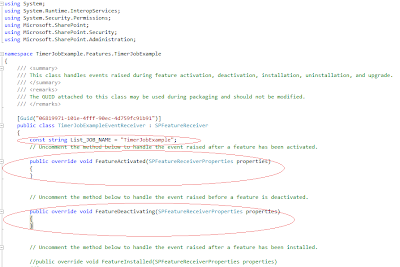
A SharePoint Feature is a functional component that can be activated and deactivate at various scopes throughout a SharePoint instances. Scopes include Farm WebApplication Site (site collection) Web (site) Features have their own receiver architecture, which allow you to trap events such as when a feature is installing uninstalling activated deactivated The element types that can be defined by a feature include menu commands link commands page templates page instances list definitions list instances event handlers workflows The two files that are used to define a feature are feature.xml manifest file(elements.xml) The feature XML file defines the actual feature and will make SharePoint aware of the installed feature. The manifest file contains details about the feature such as functionality. Common stsadm commands associated with feature are stsadm -o installfeature stsadm -o uninstallfeature stsadm -o activatefeature stsadm -o deactivatefeature Pleas...

Event receivers in sharepoint 2010

Image
Event receivers in SharePoint 2010: An event receiver is a class that contains one or more methods known as event handlers that are executed automatically by SharePoint in response to events such as adding item to a list.  You can use event handlers for data validation, data integrity etc. SharePoint categories events into of two types 1. Before events (synchronous events) 2. After events (asynchronous events). 1. Before events (synchronous events): These events fires before an action occurs and before SharePoint has written any data to the content database. For example ItemAdding event will fire when trying to add an item to a list. These events does support cancelling of event action. These events are always end with 'ing' like FieldAdding, ItemAdding, ItemUpdating, WebAdding, WebDeleting etc. These events are also know as synchronous events.   2. After events (asynchronous events): These events fire after the event action has completed and after ...