Posts

Site Collection Administrator vs Site Owner (Full Control) in SharePoint
Image
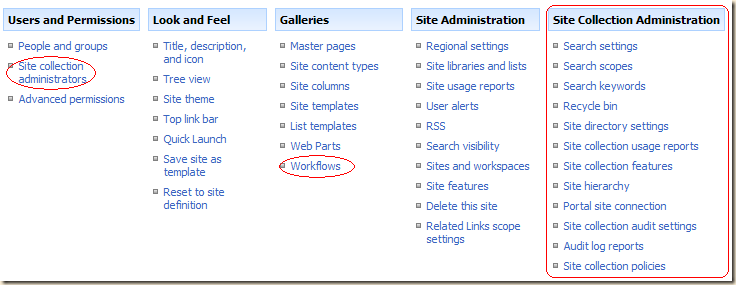
SharePoint Server (system?) Administrator  – responsible for the physical servers, software installation, backup, etc. SharePoint Site Collection Administrator  – the user responsible for the entire site collection , has access to Site Collection wide features in several places including Site Settings. SharePoint Site Owner  – a user with “full control” rights to a single site , it’s lists, libraries and content, and any sub sites and workspaces created below it.  I.e. responsible for a “branch” of a site collection.  Here's a list of what the Site Collection Administrator can see that the Site Owner (Full Control user) can not:  Site Actions -> Site Settings -- Users and Permissions   ---- Site collection administrators (only an option when at a top level site)  -- Galleries   ---- Workflows  -- Site Administration   ---- Content and structure logs  --  The entire Site Collection Administration column...

Advantage of PowerShell

Windows PowerShell is a command-line shell and scripting language that  provides an administrator full access  to applicable application programming interfaces ( APIs ). Administrators  can interact directly  with SharePoint 2013 to manipulate web applications, site collections, sites, lists and much more. In addition, an administrator can script cmdlets (pronounced "command-lets"). Advantage Without using PowerShell, you may limited to the use the GUI of Central Administration, SharePoint Designer and Site Settings. There are a number of features that you simply can't use without running PowerShell because there is no GUI support for those features.

load vs loadquery && ExecuteQuery vs ExecuteQueryAsync in sharepoint

Load  Load() populate the client object directly with what it gets data from the serve r i.e. a sollection eg. ListItemCollection. Means Load() returns ListCollection. LoadQuery LoadQuery() returns the data as a new collection in IEnumerable format . LoadQuery() is flexible than Load() when you are working with more than one query(i.e More than one list) because LoadQuery() returns data in IEnumerable<> format which is easy to acces. Load LoadQuery Load method populates the data whatever it gets from the server. Note: Mostly it is Useful for get single list LoadQuery method populates the data in completely new object of the type – IEnumerable  Note: Mostly it is Useful for multiple list Example : Var List = ClientContext.Web.Lists.GetByTitle("ListName"); ClientContext.Load(List); ClientContext.ExecuteQuery(); Example : IEnumerable ListCollection = ClientContext. LoadQuery (ClientContext.Web.Lists); ClientContext.ExecuteQuery(); Object is loaded into ClientCo...

SharePoint 2010 API (Application Programming Interface)

( API ) specifies how some software components should interact with each other Microsoft SharePoint 2010 provides three sets of APIs The server-side object model The managed client object model Web services Deciding Which SharePoint 2010 API to Use Each API has advantages and limitations that you need to understand before you begin planning and developing custom solutions.  For example, the server-side object model provides the most extensive set of options for developing customizations, but it can be used only on computers that are running a version of SharePoint 2010. See this link for more details

What are Site Columns?

 Its a central, reusable column definition.  A site column can be used across sub sites or lists inside the site collection. See this codeproject link to know more

Which is better, CAML query or LINQ query in SharePoint 2010 ?

Collaborative Application Markup Language  ( CAML ) vs  Language-Integrated Query ( LINQ ) CAML is always better than LINQ because if you write LINQ query then finally it converts in CAML internally so it down the performance. Of course there is other advantages of LINQ like: Sorting/filtering/can return objects / Most imp part, it is object oriented etc. LINQ Example: site.Load(Groupcoll, groups => groups.Include(group => group.Users)); CAML Query Example: <View>   <Query>     <Where>       <BeginsWith>         <FieldRef Name="ContentTypeId" />         <Value Type="ContentTypeId">0x010200</Value>       </BeginsWith>     </Where>   </Query>   <ViewFields>   </ViewFields>   <RowLimit Paged="TRUE">214748364...

Hide SpRibbon sharepoint 2010 for different user permissions

                Some times you may want to hide the SharePoint ribbon for some users who is having lower permissions.For that You need to do some modifications on master page.See the following steps  We can  hide it from everyone except the users who have Full Control. Step 1: Open your master page and find <div id="s4-ribbonrow" tag Then you need to add a new tag, which will hold the above tag.See the following code < SharePoint:SPSecurityTrimmedControl   PermissionsString = "ManagePermissions"   runat = "server "> < div   id = "s4-ribbonrow"   class = "s4-pr s4-ribbonrowhidetitle" >     <!-- Ribbon code appears here... -->   </ div > </ SharePoint:SPSecurityTrimmedControl > Here PermissionsString=" ManagePermissions " is a permission level which you need to add in SharePoint site and then give the permission levels to groups So people who are all having...