Posts

A type named 'SP.Data. could not be resolved by the model error

Image
When we are trying to update task list we will get this error " A type named 'SP.Data. could not be resolved by the model error. When a model is available, each type name must resolve to a valid name must resolve to a a valid type" This happens because there is a space in the list name. To resolve this issue we need to get the exact list name to be used in "SP.Data" 1.Use the below URL in chrome browser <SiteUrl>/_api/web/lists/GetByTitle('List Name')/ For Example:  https://SiteURL/_api/web/lists/GetByTitle('Workflow Tasks')/ Some times in Chrome browser you may get Authentication error. For that first open the list from your Chrome browser & then use the above URL. 2.Find "SP.Data" -> now you will get the list name that you can be used in SP.Data.ListNameListitem
JSOM & REST API All Posts

JSOM & REST API All Posts CRUD Operations using JSOM in SharePoint 2013 CRUD Operations using Rest API in SharePoint 2013 SharePoint Rest API Query more than 5000 items SharePoint REST API: Selecting, Filtering, Sorting Results in a SharePoint List jquery callback methods for asynchronous loop to finish People Picker get using (sppeoplepicker.min.js) & update(Single User & Multi User) using REST API IN SHAREPOINT 2013 PeoplePicker get & Update List Item using Rest API in SharePoint 2013 PeoplePicker get user name using Rest API Get Login Name and Display Name by User ID using SharePoint 2013 REST API Get all user names instead of User ID from a List using Rest API SharePoint 2013 Upload Single/Multiple file by using the REST API and jQuery SharePoint 2013 A type named 'SP.Data. could not be resolved by the model error Get query string from javascript Get Current Login User Details using Rest API in SharePoint 2013 jquery.dataTables Example jquery ...

CRUD Operations using JSOM in SharePoint 2013

CRUD OPERATIONS USING  JSOM  IN SHAREPOINT 2013 Here you can find the some basic operation(Create,Update,Read,Delete) list items in SharePoint 2013 using JSOM. We can use the Content Editor web part to call the script files. Include Script files in Content Editor: Go to content editor -> Edit Source -> enter the code like below (code for including the script files) For 'jquery.min.js' we can either use direct link from online or we can download to our SharePoint library & We can use that. <script src=" https://ajax.googleapis.com/ajax/libs/jquery/1.10.2/jquery.min.js" ></script> <script src=" /sites/<site>/<subsite>/SiteAssets/jquery-1.11.1.min.js "></script>  <script src="/ _layouts/15/sp.runtime.js" type="text/javascript" ></script>  <script src=" /_layouts/15/sp.js" type="text/javascript "></script>  <script src=" /sites...

CRUD Operations using Rest API in SharePoint 2013

CRUD Operations using Rest API in SharePoint 2013 Here you can find the some basic operation(Create,Update,Read,Delete) list items in SharePoint 2013 using Rest API. We can use the Content Editor web part to call the script files. Include Script files in Content Editor: Go to content editor -> Edit Source -> enter the code like below (code for including the script files) For 'jquery.min.js' we can either use direct link from online or we can download to our SharePoint library & We can use that. <script src=" https://ajax.googleapis.com/ajax/libs/jquery/1.10.2/jquery.min.js" ></script> <script src=" /sites/<site>/<subsite>/SiteAssets/jquery-1.11.1.min.js "></script>  <script src=" /sites/<site>/<subsite>/SiteAssets/Test.js " type="text/javascript"></script>  <button onclick="LoadControls()" type="submit">submit</button>  ...

Web.config

Web.config Web.config is the main settings and configuration file for a web application. The file is an XML document that defines configuration information regarding the web application. Where is SharePoint web.config? There is a separate web.config file for each Web Application / IIS Website which is running an instance of SharePoint.  For example, there will be a web.config file in the root of the virtual directory for each application. There is also a separate web.config file which contains configuration details for the "_layouts", "_catalogs", etc directories of SharePoint sites. see this link for more info Locatiom: Drive\Inetpub\Wwwroot\WSS\VirtualDirectories\<port number of your web-application>\web.config see this link for more details

Silverlight Chart: Displaying Data Above the Bar

Image
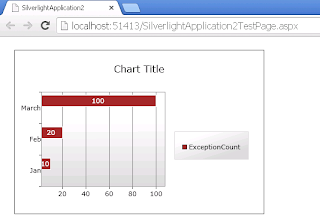
BarSeries bar value in top of the column in silverlight chart:    Your final output will come like this XAML code:   Style :   Add the following Style to your xaml code    <UserControl.Resources>         <Style x:Key=" SeriesStyle1 " TargetType=" toolkit:DataPoint ">             <Setter Property="Control.Background" Value="Brown"></Setter>             <Setter Property="Control.Foreground"  Value="White"></Setter>             <Setter Property="MinHeight" Value="10" ></Setter>             <Setter Property="MaxHeight" Value="20" ></Setter>             <Setter Property="Control.Template" >                 <Setter.Value>        ...